New Version 1.1.0 for Windows and Linux
Every title
in its place.
A fast desktop library manager for your movies and TV shows. CineVault reads your folders, fills in details, ratings and artwork, writes complete NFO files for Kodi, Jellyfin and Emby, and tidies every name, with Undo for all of it.
Free and open source. Windows 10 and 11, 64-bit, and Linux (beta). macOS is coming soon.
How it works
Scan, Scrape, Rename.
One verb per job. Every title moves through three stages, and you always see where each one stands.
-
1
Scan
NewAutomatic. Add your movie and TV folders and CineVault finds every title, keeps its extra files with it and watches for changes. NFO files already on disk are read first, so titles that have them arrive already Scraped.
-
2
Scrape
ScrapedWhen you ask. Each title gets a match with a confidence score, and Accept all confident takes the sure ones in one click. Every Scrape writes the complete NFO and all the artwork next to the file.
-
3
Rename
RenamedFrom a template. A word-level preview shows exactly what changes, conflicts are settled on their own row, and nothing moves until you say so. History can put it all back.
Library
Movies, shows and collections, at a glance
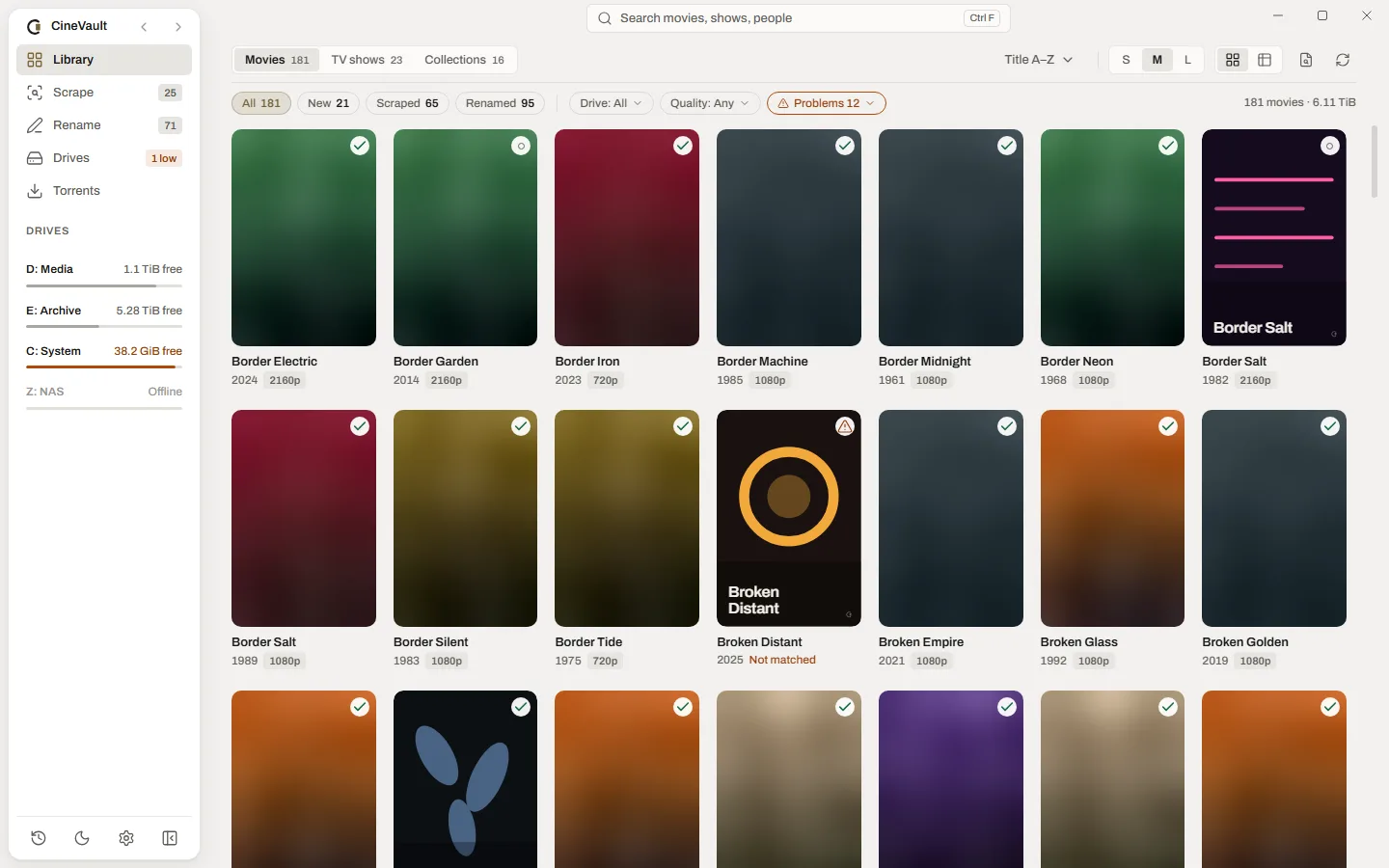
A poster grid whose size you choose, or a table with a Stage column where every column sorts. Drag a column header to move it and its edge to resize it. Filter by stage, drive, quality or problems.
- Clear New, Scraped and Renamed tags on every title
- Automatic collections, with the films you are missing
- Problems filter for unmatched titles and missing files

TV shows
Every season, with the gaps marked
TV shows open on their seasons, with missing and unaired episodes marked and season artwork for each one. Open an episode in place to see its details, and a collection appears by itself once you own two films of the same set.
- Show, season and episode pages with season artwork
- Missing and not-yet-aired episodes marked on each season

Search
Find any title as you type
Type in the search box at the top and matching titles appear at once, grouped as the top hit, movies, TV shows and collections, each with its stage. It forgives punctuation, accents and small typos, remembers your recent searches, and See all results opens the full list.
- Press Ctrl+F to jump to the search box
- Arrow keys highlight a result and Enter opens it; Enter on its own searches the Library

Movie page
The whole film on one page
Plot, cast and crew, ratings side by side and the real video and audio formats read from the file. Every rating links to the movie's page on its site.
- TMDB with every Scrape; IMDb, Rotten Tomatoes, Metacritic, Letterboxd, Trakt and more with your own free OMDb or MDBList key
- Resolution, HDR and Dolby Vision, audio formats and subtitles from the file
- Pick any poster, fanart, logo, clear art, banner, disc art or thumb in the artwork picker

Match picker
Know the match before you take it
Every candidate comes with a confidence score and the reason for it. Pick another one and CineVault shows what will change first: the title, the director, the runtime against your file, and the files it rewrites.
- Accept all confident takes every sure match at once
- Search by title and year, or paste a link or an ID
- Complete Kodi, Jellyfin and Emby NFO and all artwork on every Scrape

Rename
Tidy names, and nothing moves until you say so
The preview strikes out the words that go and marks the ones that come, and a clash with another title is settled right on its row. Nothing is renamed until you apply it, and History can put it back.
- A word-level preview of every folder and file
- Conflicts settled on their own row, held-back titles marked

Naming styles
Pick a style, or write your own
In Settings, one Style control fills the movie folder, movie file and TV episode templates at once: Clean, Detailed or Media-server safe. Edit any template and it becomes your own; choosing a style over your own templates asks first.
Dune.Part.Two.2024.2160p.WEB-DL.DV.HDR10.TrueHD.Atmos.7.1-GRPDune - Part Two (2024)Template {Title} ({Year})

Drives
See where the space went
Free space on every drive, the titles on each one biggest first, and a warning when a drive runs low. Move titles to another drive and CineVault copies, verifies the copy, and only then sends the originals to the Recycle Bin (the Trash on Linux).
- Copy, verify, then the originals to the Recycle Bin or Trash
- Quality and size of every title, per drive
- Offline drives keep their titles until they come back

Torrent search
Find a better copy
Search a movie or a show from inside the app: type a title and pick it from the suggestions, then filter by resolution and see at once whether each release is the Same as, Better or Worse than the copy you own. CineVault only hands the release you pick to your own torrent app.
- Results with quality, size, seeders, source and age
- Search a whole show, one season or one episode
A short notice appears on your first visit: You are responsible for what you download and share.

History
Undo for everything that touches your files
Renames, moves, deletes, artwork and match changes are all kept in History, each with its own Undo. Delete sends a title to the Recycle Bin (the Trash on Linux); erasing it for good takes Shift+Delete and a typed confirmation.
- Undo a whole batch or a single change
- Replaced artwork is kept, so Undo puts it back

And also
The little things
Your media centre reads it
NFO files and artwork in the Kodi, Jellyfin and Emby formats, kept up to date every time something changes.
Light and dark
Follows your system theme, with zoom from 80% to 150% for any screen.
Quick with the keyboard
Arrow keys, Enter, Delete, Esc and Ctrl+F for search cover the everyday work.
Private by design
No account and no telemetry. Your own provider keys stay in the system's credential store or keyring.
Nothing lost
Deletes go to the Recycle Bin or the system Trash, leftovers to a trash folder, and every rename can be undone.
Fast on big libraries
A Rust core and a poster grid that stays smooth with thousands of titles.
Download
Get CineVault 1.1.0
Free and open source. Updates arrive inside the app, signed with the project key.
Windows
Windows 10 and 11, 64-bit, with Microsoft Edge WebView2 (built into Windows 11; the installer fetches it on Windows 10).
Installer18.5 MBOr the MSI installer or the portable zip, which keeps everything in its own folder.
The Windows builds are not code-signed yet. If SmartScreen stops the installer the first time, choose More info, then Run anyway.
Linux (beta)
Ubuntu 22.04 or newer, Fedora 38 or newer, 64-bit (x86_64). The AppImage updates itself; it needs FUSE 2 (libfuse2t64 on Ubuntu 24.04).
Or the .deb package for Debian and Ubuntu, or the .rpm package for Fedora.
After the download, make the AppImage runnable with chmod +x CineVault-x86_64.AppImage, then open it.
The Linux version is a beta. Expect rough edges, and report what breaks in the issue tracker.
- 1
Install and open
Run the installer, or unzip the portable copy anywhere.
- 2
Add a free TMDB key
Create one at themoviedb.org and paste it in. OMDb and MDBList keys are optional and add more ratings.
- 3
Add your folders
CineVault scans them right away. Then Scrape and Rename from the sidebar.
Open source
Free, and open to everyone
CineVault is open source under the Apache-2.0 licence. Read the code, report a problem, suggest an idea or send a fix. Contributions are welcome.